


enRoute Delivery Route Planner
4.328.00 Reviews
App Specs
- Version
- 2.0.1
- Updated On
- License
- Free
- Downloads
- 10,000+
- Developer
- Astraler
- Categories
- Maps & Navigation
- Platform
- Android
Screenshots
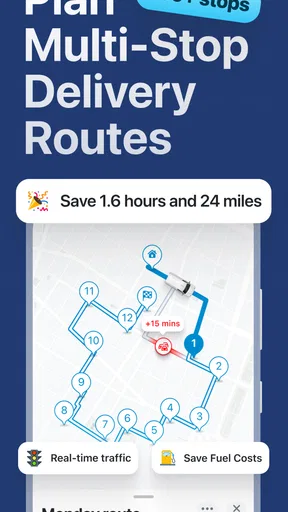
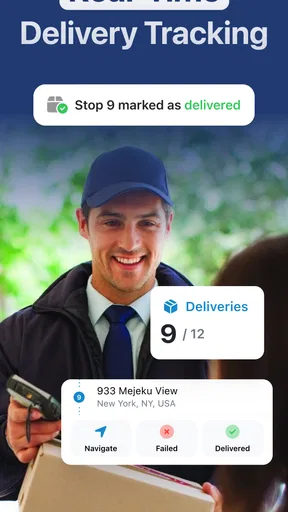
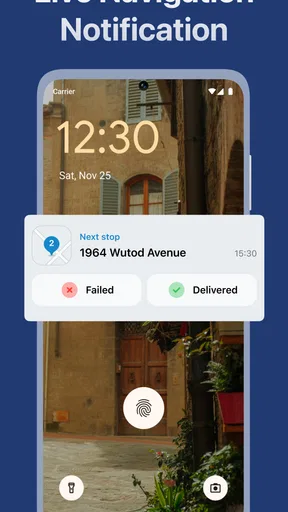
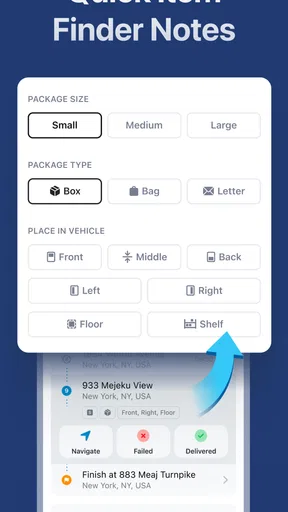
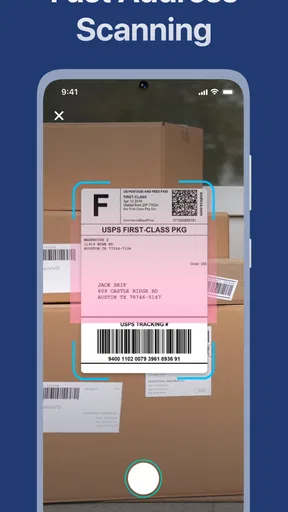
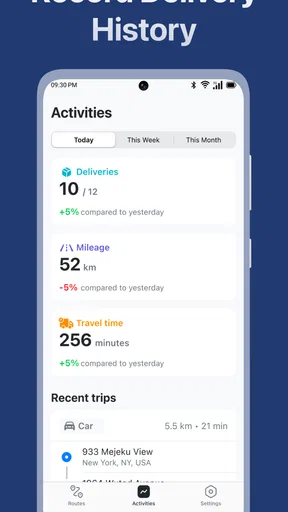
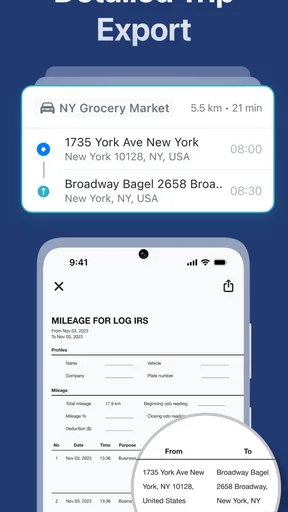
 Analysis by AppCompare
I approached enRoute Delivery Route Planner as a practical Maps & Navigation tool rather than another general-purpose map. Its purpose is clear: help turn several delivery stops into a more sensible driving plan, with GPS guidance supporting the trip once the route is ready. That focus makes it interesting for couriers, small businesses, service workers, and anyone who regularly drives to multiple addresses in one outing.
My overall impression is positive, but it depends heavily on how carefully the trip is prepared. The app can save time and fuel when the stops are entered cleanly and the driver checks the result before leaving. It is less convincing as a complete replacement for a mature everyday navigation service. I would use it when organizing a delivery run, then pay close attention to the actual road conditions, address quality, and phone connection rather than assuming the first calculated order is automatically perfect.
What enRoute is best at, and where people get stuck
The strongest idea here is separating multi-stop route planning from the usual experience of entering one destination at a time. A normal map app is excellent when I know where I am going next. A delivery planner has a different job: it should help me think about the whole run before I start driving. That distinction matters when a route includes several customers, pickups, returns, or service appointments.
The first place users can get stuck is usually before navigation even begins. A route may look wrong because an address was entered in an incomplete format, a building shares an entrance with another property, or a stop was placed on the wrong side of a divided road. Those are not dramatic app failures, but they create real delays. I would treat every planned stop as something to inspect, especially when the address comes from a handwritten note, a text message, or a customer who has given a business name instead of a street number.
Another point of friction is expecting the planner to understand delivery priorities automatically. A route can be geographically efficient and still be unsuitable if one parcel has a time commitment, a refrigerated item must be delivered first, or a customer will only be available during a narrow window. I would organize those constraints myself before accepting the suggested sequence. The app can help with the driving order, but it should not be expected to know the business rules behind each stop.
That is also why I would not judge the app only by whether it produces the shortest-looking line on a map. A useful delivery route considers access roads, parking, loading areas, apartment entrances, and the time needed at each stop. A route that saves a little distance but sends me through a difficult commercial entrance may be worse in practice. enRoute is most useful when I combine its route planning with local knowledge instead of handing over every decision.
A sensible first setup
Before using it on a busy workday, I would make a short test route with familiar destinations. This gives me a chance to see how the app presents stops, how I adjust the order, and how guidance behaves once the drive starts. Testing with known addresses is more useful than discovering the workflow while a customer is waiting.
Worth Reading Before You Choose

Flipboard Shows What News Apps Must Do Beyond the Feed

Switching to Android Auto Means Rethinking Your Driving Routine

Google Calendar Makes a Crowded Week Easier to Manage

Ludo King Makes the Most of the Minutes Between Plans

Baby Panda World Brings Quick Play to Modern Phones, but Its Game Library Feels Busy

ESPN’s Live Game View Makes Following Close Games Easier
I would also check the phone itself. Location services should be available, the device should have enough battery for the trip, and the screen should be positioned where it can be viewed safely without handling the phone while driving. If the route depends on mobile data, I would confirm that the planned area has coverage and that the phone is not in a restrictive battery-saving mode that interferes with location updates.
The practical setup question is not simply whether the app opens. It is whether the complete chain works: entering a stop, confirming the correct place, arranging the run, starting navigation, and recovering if one destination changes. A quick rehearsal exposes more than reading a feature list. It also helps reveal whether the app fits my own delivery habits or whether I would be faster using a conventional map service and a separate list.
Because the app is free to install, it is easy to try without committing money at the beginning. It does include optional purchases ranging from $3.99 to $29.99 per item, so I would look carefully at any purchase screen and decide whether the added value matches my workload. A casual user may never need to spend anything, while someone planning routes frequently may evaluate the paid options differently. I would not buy an upgrade until the basic workflow has proved useful on real, low-risk trips.
The app is suitable for Everyone, which makes it approachable for a broad audience, but that age classification should not be confused with professional training. A young or inexperienced user still needs normal road-safety supervision and should never adjust a route while moving. The safest habit is to finish planning while parked, then rely on voice or visual guidance without repeatedly interacting with the device.
Recovering when a route does not behave as expected
If the route order seems unreasonable, my first recovery step would be to inspect the stops rather than immediately blaming the navigation. I would compare each displayed location with the intended address, remove extra punctuation or confusing business details, and check whether a unit number or entrance note has been interpreted correctly. Re-entering one problematic destination is often more productive than rebuilding the entire run.
If one stop becomes unavailable, I would avoid improvising by repeatedly tapping the screen during the drive. I would pull over, decide whether to skip the stop temporarily or place it later, and then update the plan while stationary. This is especially important on delivery routes because an apparently small change can affect the next several destinations. A calm pause is safer and usually faster than trying to repair the sequence in traffic.
When GPS positioning looks inaccurate, I would first move away from underground parking, dense structures, or locations with a poor view of the sky. I would give the phone a moment to settle, verify that location access is active, and check whether the device has entered a power-saving state. If the blue position marker remains unreliable, I would use visible landmarks and road signs rather than following an obviously incorrect instruction.
A useful recovery habit is keeping the original stop list somewhere outside the active route. That could be a work order, a paper sheet, or a simple note prepared before leaving. I would not rely on memory after changing the sequence. The planner is there to reduce mental load, and a backup list makes it easier to continue if the app closes, the phone restarts, or a destination needs to be handled manually.
I would also distinguish between a route recalculation and a genuine planning error. Missing a turn can cause navigation to find a new path, which may be normal. Sending me toward an inaccessible private road, an incorrect property, or a location on the wrong side of a highway is different and deserves a stop check. In delivery work, the driver remains responsible for recognizing when a digital suggestion conflicts with the physical surroundings.
When the app is not the real cause of the problem
Many complaints about navigation apps actually begin with the source address. Customers may provide a postal address that points to a large complex, while the useful information is a gate number, loading entrance, floor, or nearby landmark. No route planner can reliably infer every detail from a vague message. I would collect those practical instructions before building the route and keep them attached to the correct stop.
Traffic and road restrictions can also change the result after planning. Construction, temporary closures, events, weather, and vehicle-specific restrictions may make the most direct route unsuitable. A delivery planner can organize destinations, but it cannot remove the need to read signs or follow local rules. If I drive a larger van, I would be especially cautious about narrow roads, weight limits, height barriers, and turning space that a normal car route may not reflect.
Phone hardware is another overlooked factor. An older device, weak battery, overheating, or an unreliable charging cable can make any navigation app appear unstable. I would test the phone on a short route, keep it cool and charged, and avoid placing it where the GPS signal is obstructed. If other navigation tools show the same position problem, the issue is probably the device or environment rather than enRoute itself.
There is also a human cause: a route may be technically correct but operationally unrealistic. If I allow no time for parking, signatures, elevator rides, customer conversations, or failed delivery attempts, the schedule will fall behind even when the driving order is sensible. I would use the planned sequence as a framework, then add a realistic buffer in my own timetable. This is one of the most important trade-offs for anyone moving from personal navigation to regular delivery work.
How it compares with ordinary map apps
For a single destination, I would usually prefer a familiar general map application. Those tools tend to be more natural for searching places, checking businesses, exploring nearby options, and getting directions to one location. enRoute makes more sense when the problem is not “how do I reach this address?” but “how should I handle all of these addresses in one outing?”
A handwritten list is faster for a tiny number of stops, especially when I already know the neighborhood. It also gives me complete control over priorities. The weakness is that I have to judge the order myself, and it is easy to zigzag across town or forget a stop. enRoute earns its place when the route is large enough for that mental work to become tiring but still small enough for one person to review carefully.
A spreadsheet or dispatch system may be better for a larger operation that needs customer records, assignment management, proof of delivery, reporting, or team coordination. I would not choose this app alone as a full logistics platform. Its appeal is simplicity: it can be a focused planning layer for a driver who needs a practical sequence without adopting a complicated business system.
The main trade-off is control versus convenience. A general map app may offer a richer place database and a more familiar navigation interface, while a dedicated delivery planner is more aligned with multiple stops. enRoute is worthwhile when that multi-stop focus solves a repeated problem. If I only drive to one or two places occasionally, the extra planning step may feel unnecessary.
Who should use it regularly
I can see this app helping independent couriers, local retailers, florists, repair technicians, cleaners, mobile service providers, and community volunteers. It is also useful for a person planning a day of errands across different parts of town, provided the stops are entered accurately and the route is checked against personal priorities.
The best users are people who want a repeatable pre-drive routine. They are willing to gather complete addresses, review the order, start navigation while parked, and make changes safely. For them, the value is not just the map on the screen. It is the reduction of small planning decisions that otherwise accumulate throughout the day.
I would be more cautious recommending it to someone who expects automatic business dispatching, detailed delivery records, offline operation, or specialized vehicle routing. Those needs call for a more comprehensive logistics tool or a navigation service designed around the specific requirement. I would also skip it if my trips are almost always single-destination journeys, because the dedicated planning focus would add little.
What the current release says about its maturity
The app comes from Astraler and has reached version 2.0.1. It was released on November 22, 2023, and has built a 4.3 average from around 347 ratings, with 28 written reviews. That combination suggests a product with enough public use to be considered, while still leaving me interested in how well it handles unusual delivery conditions in my own area.
It has passed 10K installs, which is modest beside the biggest navigation platforms but perfectly reasonable for a focused route-planning app. I would interpret that as a reason to test it directly rather than assume it has the same depth, coverage, or polish as a globally dominant map service. Its smaller footprint may appeal to users who want a narrower tool, but it also makes personal testing more important.
The minimum operating system is Android 8.1, so compatibility should be checked before installing on an older phone. I would use a device that can remain reliable throughout a route, not simply one that meets the minimum requirement. Navigation is a demanding everyday task, and smooth operation, readable directions, and dependable location updates matter more than installing on the oldest available handset.
My practical verdict
enRoute Delivery Route Planner is a sensible free starting point for anyone whose recurring problem is arranging several delivery stops. I like its focused purpose and the way it encourages me to plan the run before driving. The app is most convincing when I treat it as a route organizer supported by GPS, not as an all-knowing dispatcher that can solve bad addresses, impossible schedules, or changing road conditions.
My recommended workflow is simple: prepare the complete stop list, confirm ambiguous locations, arrange any priority deliveries manually, review the proposed sequence while parked, and keep a separate backup list. If something looks wrong, check the address and the surroundings before rebuilding everything. If the phone or signal is struggling, solve that physical problem first. These habits make a bigger difference than repeatedly searching for a perfect automatic route.
I would recommend trying it for a small, familiar delivery run before depending on it for a full workday. If it reduces backtracking and feels comfortable with the way you handle stops, it can become a useful part of your routine. If your needs center on rich place search, team dispatch, detailed delivery records, or highly specialized vehicle restrictions, a broader or more professional alternative will probably serve you better.
In short, this is a focused tool with a clear practical audience. The real benefit comes from careful preparation, not blind trust in the calculated order. For independent drivers and occasional multi-stop planners, that balance of simplicity and useful organization makes it worth testing, especially since the basic app is free and available to a general audience.
Pros
- Optimizes multi-stop routes to reduce unnecessary driving time.
- Supports delivery planning for multiple destinations in one trip.
- Clear map view makes stops easy to follow while on the road.
- Useful for couriers
- drivers
- and small delivery businesses.
- Can help estimate arrival times and organize daily workloads.
Cons
- Advanced route features may require a paid subscription.
- Route quality depends on accurate addresses and map data.
- Large delivery lists can take time to review and adjust.
- May use significant battery and mobile data during navigation.
- Not ideal for users who only need occasional single-stop directions.
FAQs for enRoute Delivery Route Planner
What is enRoute Delivery Route Planner used for?
enRoute Delivery Route Planner is designed to help delivery drivers and small businesses organize multiple stops into a more efficient route. Instead of entering destinations one by one and deciding the order manually, you can add your addresses and let the app arrange them to reduce unnecessary driving. It is useful for couriers, local retailers, service professionals, and anyone completing several stops in one trip.
Can enRoute optimize a route with multiple delivery addresses?
Yes, the app is built around multi-stop route planning. After entering or importing your destinations, enRoute can calculate an order intended to make the journey more efficient. The final result may still depend on traffic, road closures, delivery time windows, vehicle restrictions, and the accuracy of the addresses. It is a planning tool, so drivers should review the suggested route before starting and adjust it when real-world conditions require changes.
Does enRoute provide turn-by-turn navigation?
enRoute focuses primarily on planning and optimizing delivery routes rather than replacing every feature of a dedicated navigation service. Depending on the device and current app version, it may work alongside a preferred maps or navigation application for driving directions. Users should check how the app hands off a selected stop to their navigation system and confirm that location permissions, mobile data, and GPS are enabled before beginning a delivery run.
Is enRoute Delivery Route Planner suitable for professional drivers and businesses?
The app can be useful for independent couriers, small delivery companies, contractors, and businesses that need to visit several customer locations in one day. It is especially convenient when a driver wants a simple way to organize stops without using a complex fleet-management platform. Larger operations should carefully evaluate whether the available tools cover team assignments, live tracking, customer notifications, proof of delivery, reporting, and other advanced business requirements.
What should I check before downloading and using enRoute?
Before downloading enRoute, check its current compatibility with your Android or iOS version, pricing model, subscription terms, and any limits on the number of stops or routes. You should also review its privacy information because route planning may involve location data and customer addresses. For the best experience, prepare accurate address details, allow the necessary location permissions, and keep a reliable internet connection available while planning or navigating.


